
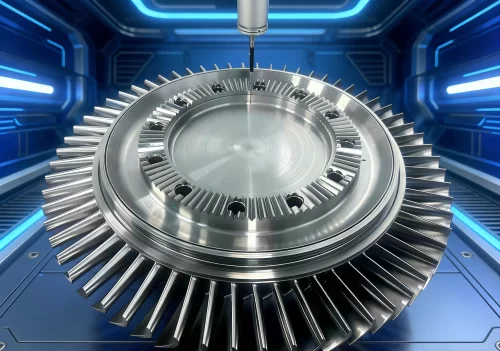

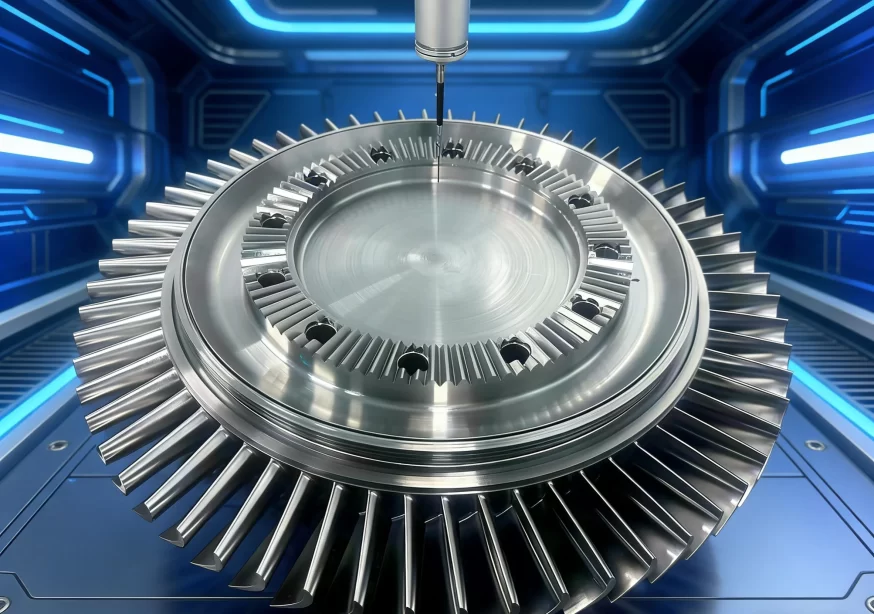
An impeller is a power-generating mechanical device that converts the energy of a flowing working medium into mechanical work; it is one of the key components of turbochargers in aircraft engines, gas turbines, and steam turbines.
The working blades have complex shapes and unique flow channels, and the quality of their machining directly affects the machine’s operational efficiency and product performance.
In engineering practice, engineers commonly use five-axis machine tools to machine monolithic blanks.
First, CAD/CAM software generates the machining paths for the impeller, and specific post-processing processes these paths before machining on a five-axis machine tool.
Although relevant research has continued for many years, problems such as the inability to share manufacturer information, high professional barriers, and difficulties for novice operators in getting started still persist.
Therefore, in the process of promoting the transformation and upgrading of the equipment manufacturing industry, research into simulation technologies for turbine and impeller machining and post-processing remains significant, as it helps improve the skill level of CNC multi-axis machining.
CNC Machining of Impellers and Toolpath Generation
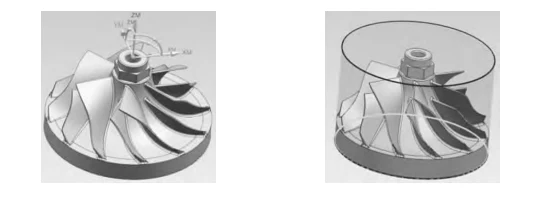
Figure 1 shows an impeller with diverter vanes.
In the initial phase, the “mill-multi-blade” module for variable-axis blade machining in NX generates the toolpath.
Then, engineers create the post-processing to generate the machining program, verify it through simulation using Vericut, and finally machine it on a five-axis machine tool.
Generating the Machining Blank
When actually machining an impeller, the blank is first created through turning.
In the UG machining environment, under [Create Geometry], select “Turning” as the type and “MCSSPINDLE” as the geometry subtype.
In the [Workpiece] dialog box, specify the impeller workpiece as a component and click the “TURNING WORKPIECE” icon.
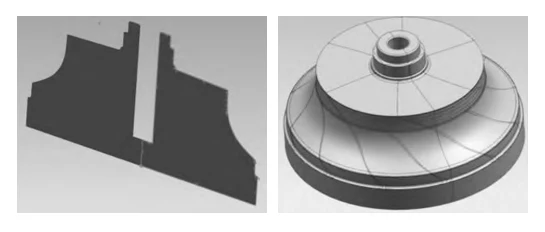
The system will then automatically generate a rotational solid that encloses the impeller’s maximum outer contour, as shown in Figure 3.
Use this contour for rotational modeling to create the turning blank for the impeller prior to machining, as shown in Figure 4, and export it as an STL format model for use in Vericut simulation.
Creating the Impeller Machining Geometry
In the UG machining environment, go to [Create Geometry], select “mill-multi-blade”, and choose from the subtypes “MCS”, “WORKPIECE”, and “MUL-TI-BLADE-GEOM”.
1) MCS Creation
Open the MCS dialog box and establish the machine coordinate system (MCS) at the center of the impeller’s top surface, as shown in Figure 1.
The machine coordinate system (MCS) also serves as the workpiece coordinate system during actual machining on the CNC machine tool.
2) WORKPIECE Creation
In the [Workpiece] dialog box, specify the component geometry as the impeller and the blank geometry as the turned blank created in Section 1.1 to complete the workpiece geometry creation.
3) MULTI-BLADE-GEOM Creation
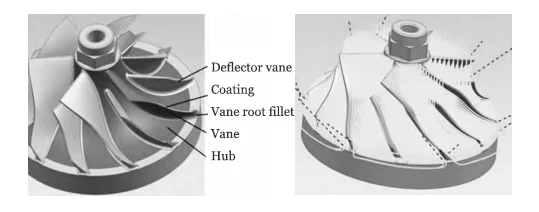
In the [Multi-Blade Geometry] dialog box, specify the geometries for the hub, envelope, blades, blade root fillet, and diverter blades, respectively.
The envelope represents the outer surface of the large blade; the blades include the left and right surfaces as well as the front and back surfaces; and the diverter blades are the small blades.
When specifying these, simply select a single geometry and enter the total number of blades, as shown in Figure 5.
Tool Selection
Based on the impeller flow channel geometry and the degree of blade curvature, a tapered ball-nose end mill is selected for machining.
The ball diameter is 2 mm, the taper is 3.5 mm, the cutting edge length is 30 mm, and the total tool length is 50 mm.
Creating an Impeller Machining Operation
Select the operation type “mill-multi-blade” for multi-axis impeller milling; subtypes include multi-blade roughing, hub finishing, blade finishing, and fillet finishing.
In the [Create Operation] dialog box, specify the program location, select the created tapered ball end mill as the tool, and ensure the geometry inherits the previously created MCS, WORKPIECE, and MULTI-BLADE-GEOM. Select “MILL-ROUGH” for the machining method.
After confirming, the system will proceed to the [Multi-Blade Roughing] settings interface.
The system automatically sets the drive method to “Blade Roughing.”
Configured parameters such as step size, cutting layers, and cutting allowance, and generated the roughing toolpath as shown in Figure 6.
Generated toolpaths for hub finishing, blade finishing, and fillet finishing using the same method.
Post-Processing Setup for Impellers and G-Code Generation
Overview of the RTCP Function on Five-Axis Machines
In engineering, five-axis machines are classified by structure into several types, including dual-turntable, dual-swivel-head, or turntable-plus-swivel-head configurations.
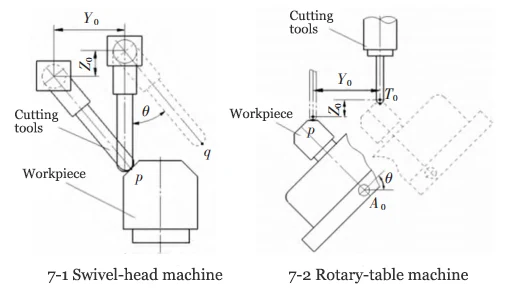
Regardless of the type of five-axis machine, since the tool rotation center (for swivel-head machines) or the workpiece rotation center (for turntable machines) does not coincide with the tool position point, rotational motion causes errors in the tool position point.
As shown in Figure 7-1, a swivel-head machine machines point p on a workpiece, fixes the tool position coordinates, and rotates the swivel head by an angle θ to perform a point-to-point vector transformation, causing the tool position to reach point q and generating errors YO and ZO.
Similarly, as shown in Figure 7-2 for a rotary table machine tool, the system positions the tool center point using linear coordinates and, when it performs tool axis vector interpolation (i.e., rotates the A-axis by an angle θ), errors also occur.
If the workpiece rotation center coincides with the tool center point TO, no error occurs, as indicated by the dashed line in Figure 7-2.
Most modern five-axis CNC systems feature functions to automatically calculate and compensate for the aforementioned errors.
Swivel-head machines use this as the RTCP (Rotational Tool Center Point) function, while rotary-table machines use it as the RPCP (Rotation Around Part Center Point) function, also referred to as the five-axis tool center point tracking function.
Development of Post-Processing for a Dual-Turret Five-Axis Machine Tool and G-Code Generation
As mentioned above, the G-code generated by a post-processor with RTCP functionality accurately records the tool position coordinates and the A- and C-axis vectors under the aforementioned MCS.
RTCP-Based G-Code and Universal Program Adaptability
Relying on the control system to perform coordinate transformation calculations to direct the machine tool’s axes to execute interpolation movements, the program is a universal program capable of adapting to various CNC machine tools equipped with RTCP functionality.
This post-processor correctly outputs five-axis tool position points and can activate five-axis simultaneous motion and multi-surface fixed-axis machining functions; such post-processing programs are generally provided by machine tool manufacturers for user use.
Post-Processing Strategy for Non-RTCP Machines
For five-axis machine tools without RTCP functionality, specialized post-processing settings must be configured based on the machine parameters.
The software post-processor calculates the tool positions and tool vectors for the machine to execute; the control system does not perform secondary calculations, and the tool position coordinates executed by the CNC machine are consistent with the G-code coordinates.
If there are changes to machine parameters, workpiece blanks, or origin settings, post-processing must be performed again to generate the G-code program.
This paper conducts research by establishing a non-RTCP post-processor for a dual-turntable five-axis machine tool.
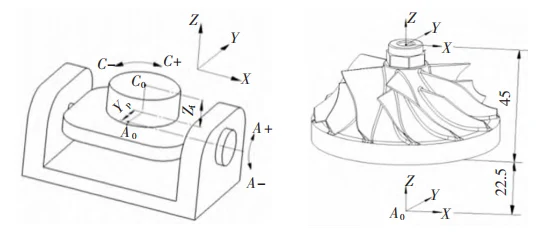
As shown in Figure 8, the structure of the dual-turntable five-axis machine tool is as follows: the distance Zf from the A-axis rotation center to the C-axis turntable surface is 22.5 mm, and the offset YP between the C-axis turntable and the A-axis rotation center is 10 mm.
Key Parameter Calculation and Offset Configuration
Located the programming origin of the impeller 45 mm above the bottom surface on the workpiece’s top surface and placed it on the C-axis rotary table during machining, resulting in a swing length of 67.5 mm, as shown in Figure 9.
Set the Y-offset from the fourth axis to the fifth axis center to 10 and the Z-offset to 67.5 in the post-processor.
The post-processor also requires the configuration of start sequences, toolpaths, program end sequences, and other related content.
Generated three post-processing files—.def, .Pui, and .tcl—after saving.
Saved the resulting G-code programs for future use after performing post-processing for each machining operation of the impeller.
Simulation of Impeller Machining
This section simulates the non-RTCP post-processing described above.
Simulation Process and Parameter Settings
Vericut is a CNC machining simulation system developed by CGTECH in the United States.
It enables NC program verification, dimensional measurement, and the detection of errors such as overcutting and out-of-travel conditions, and features realistic 3D solid rendering.
The main steps for simulating impeller machining are as follows:
1) Load the system controls and machine tool; machine tool modules can also be created as needed.
2) Load the STL-format impeller blank generated .
3) Load the STL-format impeller model for inspection and automatic comparison.
4) Create a ball-nose end mill with a 3.5 taper.
5) Establish the workpiece coordinate system and load the coordinate offsets.
6) Load the CNC G-code.
For machining simulations that do not use RTCP, the machine tool components created must ensure Zf=22.5 and YP=10.
When clamping the workpiece, the bottom surface of the workpiece must coincide with the C-axis table surface.
The coordinate origin (rotation center) must coincide with the machine tool’s C-axis rotation center, ensuring that the distance from the workpiece coordinate center to the A-axis rotation center is 67.5 mm.
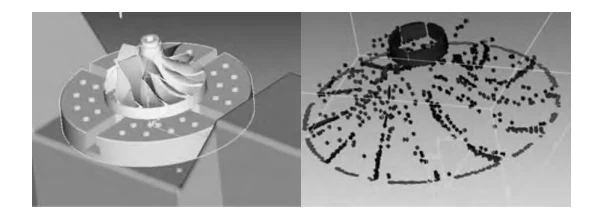
The final simulation results are shown in Figure 10, where the offset of the C-axis rotary table can be observed.
Analysis and Comparison of Simulation Results
Launch the collision analysis in VT, set the collision distance between the tool and the blank, and the system did not issue a collision warning.
Display the imported impeller blank design, set both undercut and overcut tolerances to 0.03, and perform an automatic comparison.
The comparison results are shown in Figure 11, where the red areas indicate overcut and the blue areas indicate material remaining.
The error results are within acceptable limits, indicating that the initial machining programming path and the established post-processor are usable.
Machining of Impellers on a Five-Axis Machine Tool
Performed the actual machining of the impellers on a DMG DMU100P five-axis machine tool equipped with a Heidenhain iTNC530 CNC system, featuring automatic tool setting and tool position tracking.
Placed the workpiece blank on the C-axis rotary table without requiring centering during machining.
Set the coordinate origin automatically on the blank based on the programmed center after clamping.
Used the machine’s built-in post-processing software to process the generated toolpaths and produce the machining program for execution.
The machine can also operate without tool position tracking or in a non-RPCP state; in these cases, the machine performs five-axis interpolation without tool position tracking.
Matched post-processing parameter settings with the machine’s actual specifications, and centered the blank during clamping.
Used the non-RPCP function to verify the principles and parameter settings described above.
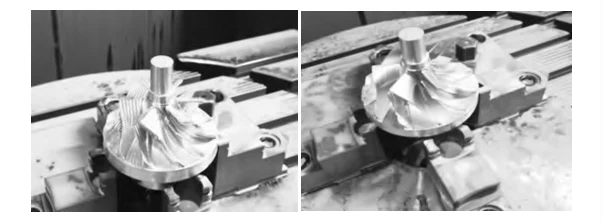
Figure 12 shows the condition of the impeller after rough machining, and Figure 13 shows the impeller after final finishing.
The successful completion of the machining process validates the correctness of the aforementioned theoretical analysis and parameter settings.
Conclusion
This paper focuses on the machining of impellers using five-axis machine tools.
It describes methods for generating automatic programming paths for five-axis impeller machining, explains the principles behind the RTCP function and post-processing structure of five-axis machine tools, and, through experimentation, identifies the key parameter settings for non-RTCP post-processing on five-axis machines.
Used VERICUT to verify the functionality of the non-RTCP post-processing.
Performed actual machining on a DMG Mori five-axis machine tool to validate the accuracy of the programmed toolpaths and post-processing, thereby providing valuable experience and insights for professionals in the field.